Pandas Dataframe Cleanser
 |
-
Pandas Dataframe Cleanser is a Jupyter Notebook extension that provides basic functionality for monitoring and maintaining dataframes.
The Pandas Dataframe Cleanser extension consist of a set of chapters (code cells) that provide basic functionality.
The Pandas Dataframe Cleanser chapters consist of the following:
Pandas Dataframe Cleanser Chapters
- System
-
System Environment is defined to review and set system configuration values.
- Data Import
-
Data Import is defined to allow import of external data into a dataframe.
- Data Inspection
-
Data Inspection is defined to allow inspection of characteristics of a dataframe.
- Data Cleansing
-
Data Cleansing is defined to allow modification of the data contents of a dataframe.
- Data Transform
-
Data Transform is defined to allow modification of the format of a dataframe.
- Data Export
-
Data Export is defined to allow the export of a dataframe to an external destination.
- SW Utilities
-
dfc Chspters are all loaded and run as QT Gui apps independent of the notebook.
The 2 exceptions are Bulk Geocoding and Graph display whihc are done within the notebook.
Pandas Dataframe Cleanser Install
-
Pandas Dataframe Cleanser is a Jupyter Notebook extension that is installed via the standard Jupyter Notebook extension installation process.
Jupyter Notebook Extension Installation consists of the following:.
- Install the dfcleanser python package
- Install the dfcleanser notebook extension
- Enable the dfcleanser notebook extension
dfcleanser Notebook Extension Installation can be installed from the following:.
- PIP
- Conda
dfcleanser PIP Notebook Extension Installation consist of the following:.
- pip install -e dfcleanser_nbextension
- jupyter dfcleanser install --user
- jupyter nbextension enable dfcleanser
dfcleanser Conda Notebook Extension Installation consist of the following:.
- conda install -c conda-forge dfcleanser_nbextension
- jupyter dfcleanser install --user
- jupyter nbextension enable dfcleanser
Pandas Dataframe Cleanser UnInstall
-
Pandas Dataframe Cleanser is a Jupyter Notebook extension that is uninstalled via the standard Jupyter Notebook extension uninstallation process.
Jupyter Notebook Extension UnInstallation consists of the following:.
- Disable the dfcleanser notebook extension
- UnInstall the dfcleanser notebook extension
- UnInstall the dfcleanser python package
dfcleanser Notebook Extension UnInstallation can be installed from the following:.
- PIP
- Conda
dfcleanser PIP Notebook Extension Installation consist of the following:.
- jupyter nbextension disable dfcleanser
- jupyter dfcleanser uninstall --user
- pip uninstall -e dfcleanser_nbextension
dfcleanser Conda Notebook Extension Installation consist of the following:.
- jupyter nbextension disable dfcleanser
- jupyter dfcleanser uninstall --user
- conda uninstall -c conda-forge dfcleanser_nbextension
Pandas Dataframe Cleanser Navigation
-
Once you have successfully installed the dfcleanser extension the dfc button should appear in the Notebook banner.

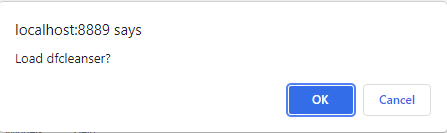
Once you verify dfcleanser is installed as a Jupyter extension click on the dfc button to load the extension in the current notebook.
Pandas Dataframe Cleanser Console
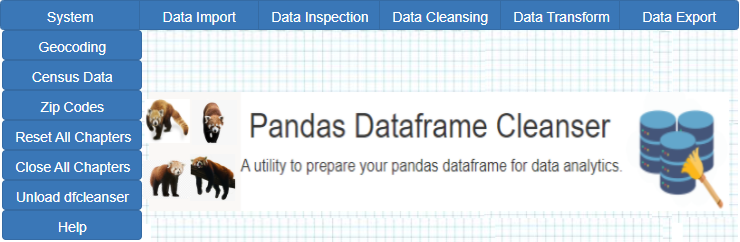
When you install dfcleanser the dfc console cell and the Restricted cell are always resident in the users notebook until dfc is unloaded.
-
When dfcleanser is installed a restricted working cell is installed that is necessary and used by dfcleanser.

The working cell used to coordinate between javascript and the notebook and should never be changed by the user.
Pandas Dataframe Cleanser Restricted Working Cell
dfcleanser Common Navigation
-
Each button in the consoles corresponds to the dfc chapters that can be loaded, unloaded and run independently..
-
Each dfc chapter is loaded a a separate QT GUI app independent of the nothebook. You can load multiple copies of the same chapter.
-
-
Each chapter has the following set of control buttons.
- Reset Chapter(s)
- Load New Chapter Instance
- Close Chapter(s)
-
If a new chapter instance is loaded a new gui app is displayed.
-
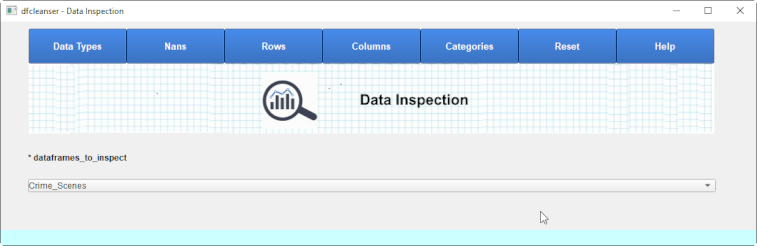
Pandas Dataframe Cleanser Reset
-
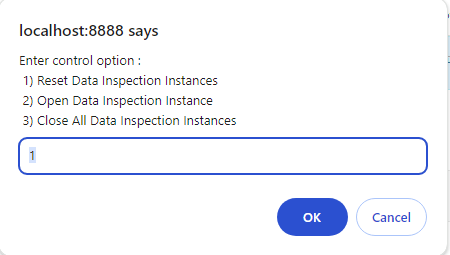
When the Pandas Dataframe Cleanser is installed you can reset all dfc chapters by clicking on the dfc button again and asking for a reset.
-
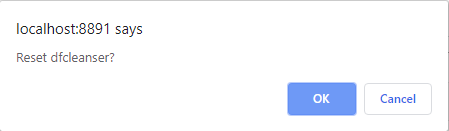
-
You can also click on the Reset All Chapters button on the dfc console.
Pandas Dataframe Cleanser Remove
-
When the Pandas Dataframe Cleanser is installed you can remove the dfc from your notebook via clicking on the dfc button and skipping past the reset(Cancel) and clicking on OK in the remove dialog.
-
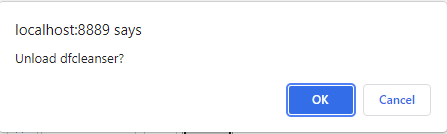
-
You can also click on the Close All Chapters button on the dfc console.
Pandas Dataframe Cleanser Conventions
dfcleanser dataframes
-
The Pandas Dataframe Cleanser(dfc) maintain a set of 'dfc dataframe' objects that are visible to any function in dfc.
A dfc dataframe object is created that consists of a dataframe title, a pandas dataframe object and descriptive notes.
Every Chapter has a dropdown selector to define the current default dataframe for that chapter. The default can be overridden in certain functions otherwise the chapter selected dataframe is used.
Until a dataframe is added to the dfc Manager no dfc chapters will open and operate correctly and the message below is displayed.
Status :
No dataframe imported to select for data inspection
Dataframes can be added to dfc via the following:
- Importing dataframe via Data Import
- Add dataframe via dfc manager
- Add dataframe via python
from dfcleanser.commom.cfg import add_df_to_dfc_dfs
add_df_to_dfc_dfs(title,df,notes)
Once a dataframe is imported into dfc then it becomes available in the selector and can be used in the chapters.
Pandas Dataframe Cleanser 'inplace' Only
-
The Pandas Dataframe Cleanser functions make all function calls to change the dataframe inplace.
Pandas Dataframe Cleanser File Browser
-
The Pandas Dataframe Cleanser uses the file browser input in multiple forms to allow the user to select files.
-
Due to the restrictions limiting access to local resources the base file path for all file selects is the path of the current Jupyter Notebook.
Setup Notes Notebook Name : PandasDataframeCleanser Notebook Path : c:\Tech\Projects\Jupyter\samples\Notebooks\RickProjects\DataframeCleanser dfcleanser path : C:\Users\Rick\Anaconda3\lib\site-packages\dfcleanser\
The current Notebook Path can be viewed from the System Environment Syatem tab.
To select a path separate from the Notebook path enter it manually.
Pandas Dataframe Cleanser Configuration Files
-
The Pandas Dataframe Cleanser uses multiple json configuration files while running. The files are defined can be broken into Notebook files and dfc files can be broken into Notebook files and dfc files.
Refer to the System Environmment section of the manual for details on configuration data.